Wavetable synthesis is one of the most flexible ways to create modern electronic sounds. It can produce evolving pads, aggressive basses, bright leads, metallic textures, and many sounds that are difficult to build with a traditional oscillator.
It can also seem more complicated than it really is.
At its core, wavetable synthesis gives an oscillator a collection of related waveforms and lets you move between them. Instead of choosing one static waveform and shaping it entirely with filters, you can change the waveform itself while the sound plays.
In this guide, we’ll explore how that works using Europa Shapeshifting Synthesizer in the Reason Rack. We’ll start with the basic idea behind wavetables, then use Europa to explore scanning, modulation, filtering, unison, and custom wave creation.
If you don’t already have Europa, you can get it in Reason or the Rack plugin, along with over 90 other Reason Rack devices.
Also, if you want to check out a more beginner-friendly overview of synthesis techniques, check out this article.
What is wavetable synthesis?
Wavetable synthesis is a method of generating sound with an oscillator that reads from a collection of waveforms called a wavetable.
A standard subtractive synthesizer might let you choose a saw, square, triangle, or sine wave. Once selected, that waveform usually remains fixed unless another feature changes it.
A wavetable oscillator works differently. Its table contains several waveforms arranged in a sequence. A position control lets you select one waveform or move continuously between neighboring shapes.
This movement is often called wavetable scanning.
A wavetable might begin with a smooth sine-like waveform and gradually become brighter and more complex. Another might move through vocal formants, metallic spectra, noisy digital shapes, or several variations of the same basic tone.
The oscillator can stay at one position, but wavetable synthesis becomes especially interesting when that position changes over time.
Wavetable synthesis vs. subtractive synthesis
Wavetable and subtractive synthesis are not mutually exclusive. Most wavetable synthesizers include filters, envelopes, LFOs, and amplifiers borrowed from subtractive synthesis.
The main difference is where the timbral movement begins.
In subtractive synthesis, you usually start with a harmonically rich waveform and remove frequencies using a filter. The oscillator supplies the raw material, while the filter does much of the tone shaping.
With wavetable synthesis, the oscillator can change its harmonic content directly. Moving through a wavetable may add harmonics, remove them, or transform the waveform into something very different.
You can still filter the result afterward. This gives you two layers of sound shaping: movement inside the oscillator and frequency shaping with the filter.
Combining both is one of the reasons wavetable patches can sound so animated.
To learn more about subtractive synthesis and how to explore it with Monotone and other Rack devices, check out this article.
Understanding wavetable position
The most important parameter in a wavetable oscillator is its position control.
Different synthesizers use names such as Position, Index, Frame, Scan, or Shape. Regardless of the label, the control determines which part of the wavetable is currently being played.
In Europa, this role is handled by the Shape parameter.

Europa has 30+ factory wavetables, each containing many waveforms. The Shape control morphs between waveforms within a wavetable, or otherwise dynamically alters it: at one end you hear one waveform, and as you turn the knob, Europa moves through intermediate shapes until it reaches another waveform.
Before we get hands on and see how this sounds, let’s make sure we’re familiar with Europa’s fundamental structure and signal path.
Europa’s sound engines
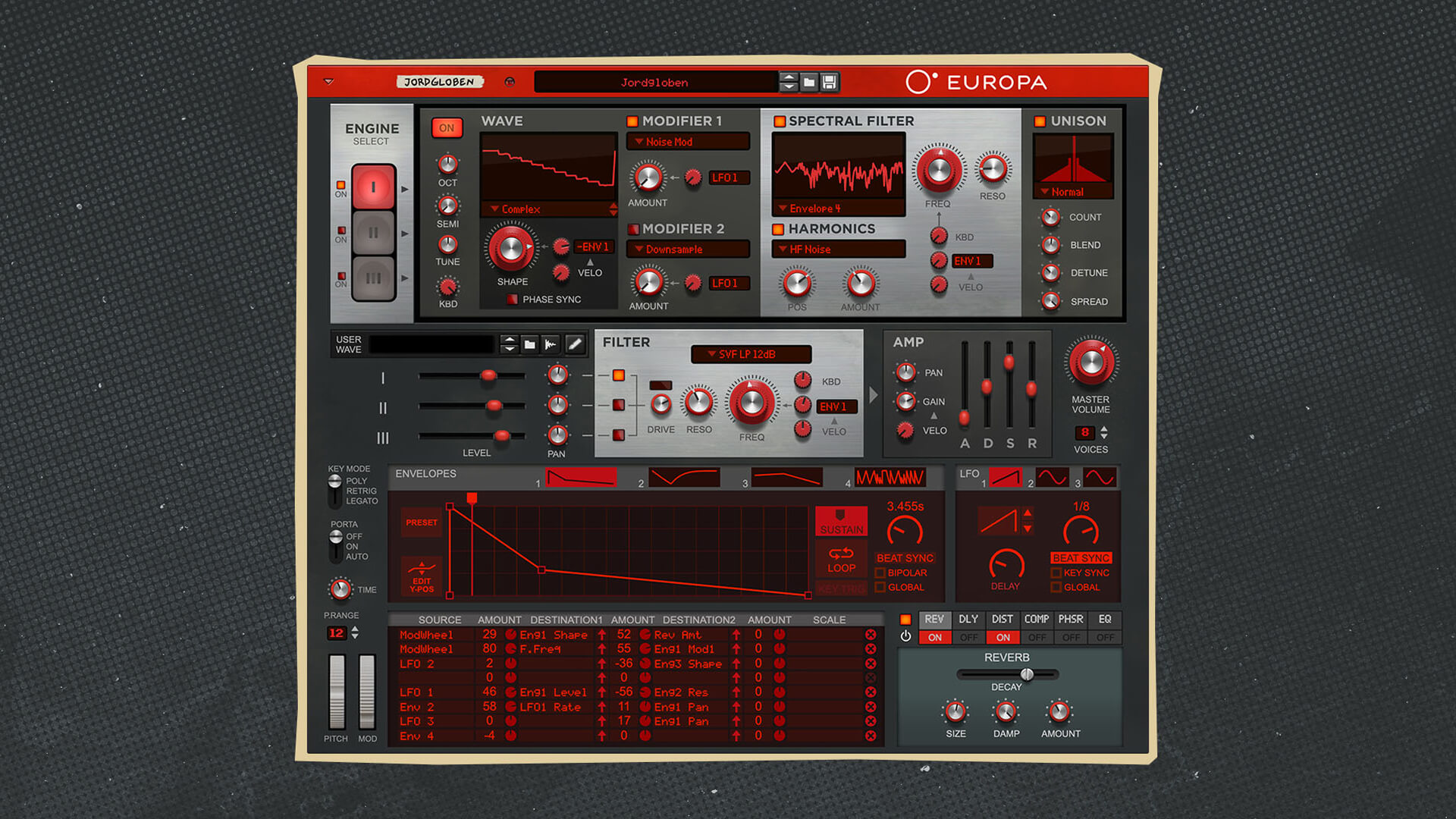
Europa contains three Sound Engines. Each one includes an oscillator, two waveform Modifiers, a Spectral Filter, a Harmonics processor, and Unison.
The three engines are mixed together before passing through Europa’s main filter, amplifier, and effects.
A signal can move through the following stages:
- The oscillator generates a waveform
- Shape changes or scans the waveform
- Modifiers alter it further
- The Spectral Filter reshapes its partials
- Harmonics changes its overtone structure
- Unison generates additional signals
- The three engines are mixed
- The global filter, amplifier, and effects process the result
You don’t necessarily need every stage to make a useful patch. The easiest way to learn Europa is to begin with one engine and add features gradually.
Build a basic wavetable patch
Alright, time to see what this adds up to with a simple sound.
- Initialize Europa (right/CTRL-click front panel > Reset Device)
- Leave only Sound Engine I active
- Choose a factory wavetable
- Set the amplifier envelope to a simple sustained shape: short Attack, short or medium Decay, high Sustain, medium Release
- Play a sustained note and move Shape manually
At this stage, the oscillator’s harmonic structure is changing directly. No filter movement is needed.
Try several tables. Some move smoothly between related tones, while others pass through much more dramatic changes. A restrained table may work well for pads, while a sharper one may suit basses, leads, or sound effects.
Automate wavetable movement with an LFO
Moving Shape by hand demonstrates the concept, but modulation is what gives wavetable synthesis its characteristic motion.
Europa includes three LFOs and a dedicated modulation source selector beside Shape.
Start with the previous patch.
- Select LFO 1 as the Shape modulation source.
- Increase the Shape modulation amount.
- Choose a triangle waveform for LFO 1.
- Set a slow rate.
- Hold a note and listen as the oscillator moves through the table.
A triangle LFO creates smooth movement in both directions. This works well for pads, sustained basses, and ambient textures.
Try replacing it with other LFO shapes:
- – Sawtooth repeatedly scans in one direction.
- – Square jumps between two positions.
- – Random creates unpredictable changes.
- – Stepped shapes produce rhythmic movement.
The modulation amount determines how far Europa moves through the table. A small amount adds subtle animation around the current Shape setting. A large amount can cover most of the wavetable.
Use Shape to choose the center of the movement and the modulation amount to set its range.
Use an envelope for one-way movement
An LFO repeats continuously. An envelope is more useful when you want the wavetable to move in one direction during each note.
This can create sounds that begin smooth and become brighter, or start sharply and soften over time.
Europa includes four drawable envelopes that can be assigned throughout the synth. They can also be looped, turning them into more complex repeating modulation sources.
To create a one-way wavetable sweep:
- Set Shape near the beginning of the table.
- Choose Envelope 1 as the Shape modulation source.
- Increase the modulation amount.
- Draw a rising envelope.
- Adjust the envelope rate.
- Make sure the envelope is not set to “Loop”
A fast ramp can create a sharp digital attack, while a slow ramp can produce an evolving pad.
Remember that Europa’s modulation envelopes are very flexible. You can select from a huge range of preset envelope curves, or create custom ones. Double-clicking the envelope line, for instance, can create a new envelope point that allows you to articulate the modulation exactly as you need.
As we turn up the modulation amount on the Shape parameter, notice how Envelope 1 changes the character of the sound significantly but in a repeatable pattern. Unlike a filter envelope, this changes the oscillator waveform itself rather than simply opening or closing a cutoff frequency. You can get some pretty interesting timbral changes with this method.
Combine scanning with filtering
Wavetable movement doesn’t make filters unnecessary. In fact, the two techniques work very well together.
Europa’s main Filter section includes state-variable, ladder, multiple-feedback, and early MS-20-type models.
Start with a patch that uses slow Shape modulation. Activate a low-pass filter, lower the cutoff, and add envelope modulation to the filter frequency.
Two changes now occur during each note: the oscillator moves through the wavetable, while the filter changes which frequencies ultimately pass through.
Try making these movements oppose each other. The wavetable can become brighter while the filter gradually closes. This can create a changing timbre without producing a simple bright-to-dark sweep.
Process the waveform with Modifiers
Each Europa Sound Engine includes two Modifiers that can alter the oscillator before it reaches the Spectral Filter.
Options include hard sync, phase distortion, wavefolding, clipping, downsampling, bit reduction, FM, harmonic generation, detuning, and formant processing.
Try using wavefolding:
- Select a harmonically rich wavetable
- Enable Modifier 1
- Choose Fold from the Shaping menu
- Increase the Modifier Amount
- Slowly scan Shape
- Modulate the Modifier Amount with an LFO
Wavefolding creates additional harmonics by folding waveform peaks back into the available range. As the wavetable changes, the folded result changes too. It’s a very common technique in West-Coast synthesis, as we touched upon in this article.
Other useful Modifier choices include:
- – Downsample for rough digital textures
- – Quantize for reduced-bit tones
- – Hard Sync for sharper harmonics
- – FM Ratio for metallic sounds
- – Formant for vocal character
Here’s how a few of the modifiers sound when applied to the main oscillator:
Use restraint when combining several bright or aggressive processes. Strong scanning, wavefolding, resonance, and distortion can quickly become harsh.
Explore the Spectral Filter
Each Sound Engine also has its own Spectral Filter before the global filter.
Rather than behaving only like a conventional cutoff filter, it reshapes the partials within the signal. Available modes include standard filter responses, vocal formants, resonators, dual peaks, comb filtering, custom curves, and filters created from imported samples.
For a clear example:
- Select a rich wavetable
- Enable the Spectral Filter
- Choose Vocal Formant
- Adjust Freq and Reso
- Modulate Freq with an envelope or LFO
The wavetable movement now interacts with a shifting formant response.
This can create talking basses, synthetic choir tones, vocal leads, and animated sound effects.
Try using separate modulation sources for Shape and the Spectral Filter. For example, LFO 1 can move Shape while Envelope 1 controls the formant frequency.
Add width with unison
Wavetable patches often benefit from stereo width, especially for pads and leads.
Each Europa Sound Engine has its own Unison section, which can generate a total of up to seven signals. Available types include Normal, Fourth, Fifth, Octave Down, and Phase Only.
To widen a patch:
- Enable Unison
- Select Normal
- Increase Count
- Add a small amount of Detune
- Increase Spread
- Adjust Blend
Too much detuning can weaken the pitch center, so start with restrained settings. It is also often best to apply unison to layers that are in the mid or high range, as it can potentially introduce muddiness or phase issues when applied to the low end, but don’t be afraid to experiment!
To gain some width without obvious pitch variation, try Phase Only. In this mode, the Detune control changes the phase relationships between the signals rather than their pitch.
Layer multiple wavetables
Europa’s three engines allow you to combine different kinds of movement within a single patch.
For example, Engine I can provide the main wavetable tone, Engine II can add a brighter layer one octave above, and Engine III can supply a quieter, smoother foundation. Choose a different wavetable for each and balance them in the Mixer section.
You can also assign the same modulation source to several engines at different amounts. For example:
- – LFO 1 slowly scans Engine I
- – An inverted version of LFO 1, or a negative modulation amount, scans Engine II in the opposite direction
- – Engine III remains mostly static
This creates a more complex result than stacking three identical oscillators.
Europa also lets you decide which engines pass through the global filter. A bright upper layer can be filtered while a lower supporting layer bypasses it.
Use a sample as a User Wave
We know what you’re wondering, and the answer is yes! Europa can load external samples and use them as oscillator material.
The User Wave and User Wave Smooth modes generate and play wavetable-style grains from the sample. Shape controls the playback position, while User Wave Smooth uses a crossfaded loop inside each grain for a smoother result.
For this, it’s generally best to use wavetable samples that have a constant pitch. Some notes on sample import can be found here.
To try it:
- Drag a sample into the User Wave section
- Select User Wave or User Wave Smooth
- Hold a note
- Move Shape
- Modulate Shape with an LFO or envelope
Europa converts stereo samples to mono. When a sample’s length is an exact multiple of 2048 samples, Europa treats each 2048-sample section as a complete waveform cycle without performing pitch detection. Other samples are analyzed to determine their pitch.
In the example below, we’ve loaded a wavetable we generated with a free online tool called CarveToy. In addition to modulating Shape with some subtle movement, we also add unison for some extra richness and width.
The source may become unrecognizable once it is pitched, scanned, filtered, and processed. That’s often part of the appeal!
Build an evolving wavetable pad
Now that we’ve taken a detailed look at how wavetable synthesis can work, let’s combine several of these ideas into one patch.
Sound Engine I
Choose a wavetable with some good weight to it, modulate Shape slowly with LFO 1 or Envelope 1, and bring it into a lower octave so that it gives our sound a strong foundation.
Sound Engine II
Choose a brighter table, tune it an octave higher, lower its level, and modulate Shape with an exponential pulse LFO. Turn on Unison for some width.
Sound Engine III
Use another bright waveform and tune it a perfect fifth (7 semitones) from the root note. Add some slow-to-medium speed modulation to Shape using a Triangle LFO.
Global dynamics and processing
Give this patch a slow attack with the Amp Envelope, then finish with a little bit of flanger and some reverb to taste.
The result combines repeating oscillator movement, one-way envelope motion, harmonization, stereo spread, and effects. The assignments do not need to be extreme. Several subtle movements often sound more musical than one dramatic sweep.
Make patches respond to your playing
Europa’s Modulation Bus lets you use sources such as velocity, Mod Wheel, aftertouch, key tracking, random values, and CV inputs.
It includes eight routing buses. Each source can control two destinations, with an additional Scale source affecting both modulation amounts.
Useful assignments include:
- – Velocity to Shape modulation amount
- – Mod Wheel to Spectral Filter frequency
- – Aftertouch to Unison Detune
- – Random to Shape
- – Mod Wheel to LFO rate
- – Velocity to filter drive
For example, assign LFO 1 to Shape and use the Mod Wheel as the Scale source.
With the wheel down, the wavetable remains mostly static. Raising it increases the movement, giving you control over the intensity while performing.
Common wavetable synthesis mistakes
Modulating the entire table every time
Full-range scanning can be useful, but smaller movements often produce more focused sounds. Find an interesting area and scan within it.
Adding too many bright processes
A sharp wavetable, strong wavefolding, high resonance, and distortion can create excessive high-frequency energy. Bypass stages one at a time and decide what is actually helping.
Making every layer move
A static sub or supporting oscillator can keep an animated patch grounded.
Ignoring the starting position
The Shape setting determines where many modulation movements begin or center. Changing it can transform the patch even when the modulation settings stay the same.
Adding unison too early
Build a strong basic waveform first. Use unison after the core tone and movement are working.
Why Europa works well for wavetable synthesis
Europa is more than a standard wavetable synthesizer. It combines factory wavetables with analog-style waves, FM, physical modeling, user samples, drawn waveforms, spectral filtering, waveform modification, harmonic processing, and unison.
That makes it useful for learning because the main idea is easy to isolate.
Start with one engine, one wavetable, and the Shape control. Once that makes sense, add an LFO, envelope, Modifier, Spectral Filter, or second engine.
Europa can become complex, but the learning process doesn’t have to be.
Start scanning
Wavetable synthesis gives you control over the oscillator’s harmonic content before the sound reaches a filter or effect.
Choose a table, move Shape, and listen closely to what changes. Then automate that movement with an LFO or envelope. Once the basic scan works, add filtering, modifiers, unison, or additional engines one step at a time.
A static waveform gives you a tone, but a moving wavetable gives that tone somewhere to go. With a really well-designed wavetable synth, you’ll end up in some pretty amazing territory before you know it!
Ready to make music with Reason?
Frequently Asked Questions
What is wavetable synthesis?
Wavetable synthesis generates sound with an oscillator that can move through a collection of related waveforms. Changing the position changes the oscillator’s harmonic content.
What is a wavetable?
A wavetable is an ordered collection of waveforms. A wavetable oscillator can select or interpolate between different positions within it.
Can Europa use custom samples as wavetable material?
Yes. Europa can load an external sample and generate wavetable-style grains from it using User Wave or User Wave Smooth. It can also crossfade between waveforms drawn in Envelopes 3 and 4.
Is Europa only a wavetable synthesizer?
No. It also includes analog-style waveforms, FM, physical modeling, noise, user samples, spectral filtering, waveform shaping, unison, and subtractive filtering.
Is Europa good for beginners?
Yes. Beginners can start with one Sound Engine and the Shape control, then gradually add modulation and processing.
How do I get Europa Shapeshifting Synthesizer?
Europa is a Reason Rack instrument available in supported versions of Reason and the Reason Rack Plugin. Check the current Reason product details to confirm its availability for your plan.